Getting your tax documents right shouldn't feel like cracking a safe. If you work for Walmart or used to punch the clock there, tracking down your Form W-2 is the first step toward filing your taxes correctly and getting your refund without frustrating delays.
Navigating corporate payroll portals, former employee options, and specific box codes can get confusing fast. Whether you're a current associate managing your documents digitally or a former employee trying to retrieve past records, here is how you access, read, and use your Walmart W-2 without the guesswork.
Accessing Your Walmart W-2 As a Current Associate
If you're currently working at Walmart or Sam's Club, getting your W-2 online is the fastest route. Walmart transitioned heavily toward digital-first delivery to cut down on mail delays and lost forms.
You can access your tax statement through the internal Walmart One portal or the designated employee payroll partner platform used by the company.
- Log into your account using your standard associate credentials and multi-factor authentication.
- Navigate to the Me@Walmart app or the associate portal dashboard and look for the "Tax Center" or "W-2 Statements" section.
- Choose your preferred delivery method. Opting into electronic-only delivery means you'll usually get your form earlier in January before physical copies hit the mail.
- Download the PDF directly to your device. Make sure you save it in a password-protected folder if you plan to upload it to tax software later.
If you didn't consent to electronic delivery, Walmart will mail a physical copy to the address they have on file by the statutory January 31 deadline. Moving without updating your address is the primary reason paper forms go missing.
Finding Your W-2 As a Former Walmart Employee
Leaving the company doesn't mean you lose access to your wage data. Former associates can still retrieve their tax documents, though the process differs slightly depending on how long you've been gone.
For recent departures, the online portal via OneWalmart often remains active for a specific transition window. If your login credentials no longer work, you'll need to use alternative retrieval paths:
- The Tax Form Partner Website: Walmart typically partners with third-party payroll processors (such as W2 Express or similar portal providers) to handle former employee wage statements. You'll enter the employer code for Walmart, your Social Security Number, and verification details.
- The Walmart HR Service Center: If online portals lock you out or your data throws an error, call the Walmart HR service line directly. Be ready to provide your full legal name, SSN, date of birth, and the specific store number or location where you worked.
- The IRS Tax Transcript Route: If you are pressed for time and can't reach payroll support, log into the IRS Get Transcript tool. You can pull a wage and income transcript directly from federal records. It contains all the exact figures reported by Walmart's payroll department, allowing you to file your taxes on time.
Decoding the Walmart W-2 Box by Box
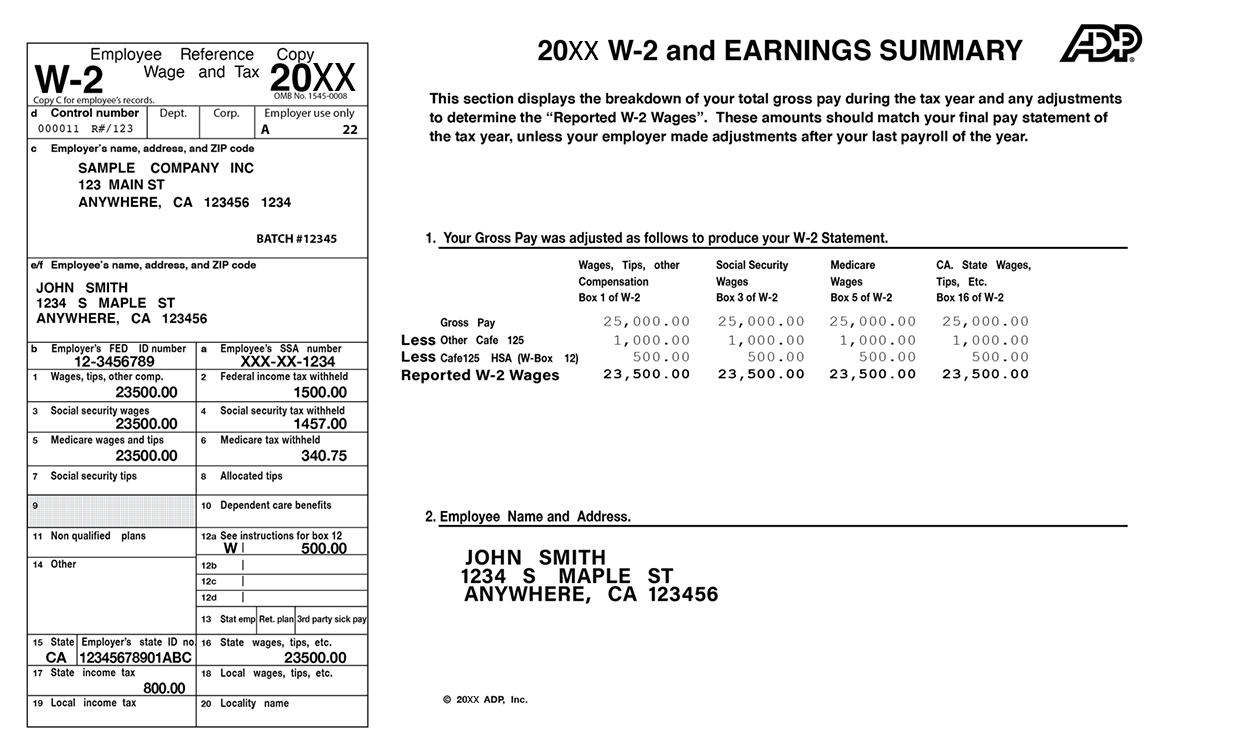
Your Walmart W-2 looks like a grid of numbers and letters, but it breaks down into simple categories once you know what to look for. Here is what the core fields mean for your paycheck:
- Box 1 (Wages, Tips, Other Compensation): This is your total taxable federal income for the year. Note that this number is usually lower than your gross pay because it excludes pre-tax deductions like 401(k) contributions or health insurance premiums.
- Box 2 (Federal Income Tax Withheld): The total amount of federal income tax Walmart deducted from your paychecks throughout the year and sent to the IRS on your behalf.
- Boxes 3 and 5 (Social Security and Medicare Wages): These boxes show the earnings subject to FICA taxes. They are often higher than Box 1 because pre-tax health deductions don't lower your Social Security and Medicare wages.
- Boxes 4 and 6: The exact taxes withheld for Social Security (6.2%) and Medicare (1.45%).
- Box 12 (Codes): You'll likely see letters here. For instance, code D designates elective deferrals to a traditional 401(k) plan, while code DD shows the total cost of employer-sponsored health coverage. These codes are mostly informational, but tax software requires you to input them accurately.
- Boxes 15 through 20: State and local tax data. If you worked in a state with income tax, Walmart reports your state taxable wages and state income tax withheld here.
Common Payroll Errors and How to Fix Them
Mistakes happen when processing millions of employee records. Catching an error early prevents audit flags and rejected tax returns.
Double-check that your Social Security Number and full legal name match your official Social Security card. A single typo in your SSN will cause the IRS computers to reject your tax return automatically.
If you spot an incorrect wage amount, missing state tax data, or a misspelled name, don't try to cross it out and fix it yourself. Contact Walmart HR or payroll support to request a Form W-2c (Corrected Wage and Tax Statement). Walmart will submit the corrected figures to the Social Security Administration, and you'll receive an updated copy to attach to your amended or original return.
Frequently Asked Questions
When does Walmart release W-2 forms?
Walmart typically makes electronic W-2 forms available by mid-to-late January. Paper copies are mailed out no later than January 31 to comply with IRS mandates.
What should I do if my Walmart W-2 hasn't arrived by February?
If you haven't received your paper form by early February and can't access the online portal, contact the Walmart HR Service Center. Alternatively, pull your wage data using the IRS transcript tool or import your data directly into tax preparation software using Walmart's Employer Identification Number (EIN).
Why is Box 1 lower than my total annual earnings?
Box 1 excludes pre-tax deductions. Money you set aside for health insurance premiums, dental plans, or traditional 401(k) contributions is taken out before federal income taxes are calculated, reducing your taxable gross.
How long should I keep my old Walmart W-2 forms?
Tax professionals and the IRS recommend keeping copies of your tax returns and supporting W-2 statements for at least three years. However, holding onto them for up to seven years provides a safe buffer if the IRS ever audits a past filing or questions retirement earnings credits.



