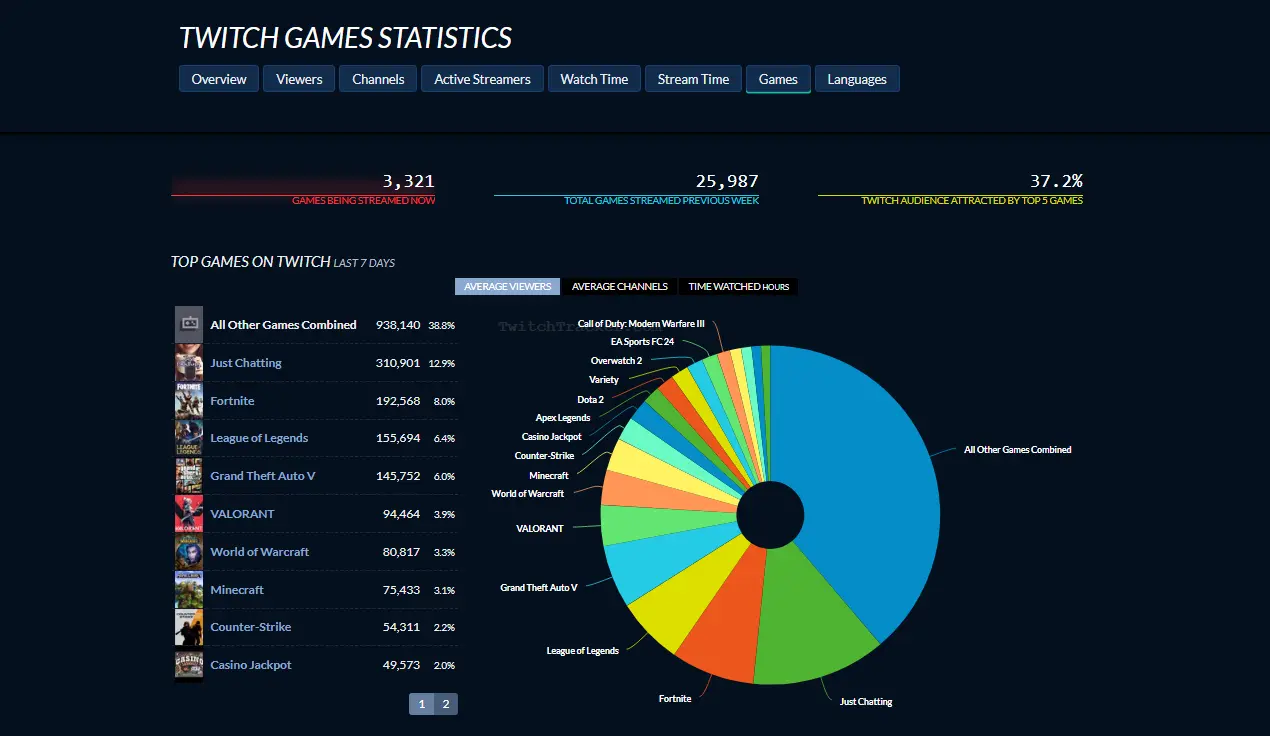
If you stream on Twitch, you already know the built-in creator dashboard only tells half the story. You see your own numbers, but you don't know how competitors grow, which game directories are saturated, or what global viewership trends look like. That's where Twitch data platforms come in handy. TwitchTracker is one of the most popular third-party intelligence sites for tracking channel growth, game popularity, and global streaming statistics without needing complex software.
Understanding how to read these metrics helps you find unsaturated streaming categories, evaluate sponsor pitches, and benchmark your growth against similar creators. This guide breaks down every core feature on TwitchTracker, explains what the metrics actually mean, and shows you how to use them to optimize your channel.
What is TwitchTracker and How Does It Work?
TwitchTracker is an independent analytics platform that scrapes and indexes public data from Twitch APIs. It compiles historical and real-time records for millions of channels, games, and streaming languages. Unlike your internal dashboard, which focuses exclusively on your own community, TwitchTracker gives you a macro view of the entire platform alongside granular logs for individual creators.
When you look up a channel on the site, you aren't seeing secret backend data. You're seeing a public ledger of when that channel went live, how many concurrent viewers tuned in, what game they played, and how many followers they gained over a specific timeline. Creators use this intelligence to spot rising trends, analyze successful peers, and find optimal broadcast schedules.
Decoding Core Metrics on TwitchTracker
When you open an individual streamer's profile or check game statistics, you'll see a barrage of acronyms and data points. Let's look at what they mean and why they matter for your channel strategy.
Average Viewers and Peak Viewers
Average concurrent viewers is the single most important metric on Twitch. It dictates your visibility in directory listings and serves as the primary benchmark for affiliate or partner status.
- Peak viewers shows the highest number of simultaneous watchers you achieved during a specific broadcast or time window.
- High peak numbers often indicate successful raid coordination, viral moments, or raid trains from larger creators.
- A massive gap between your peak viewers and average viewers means your retention fluctuates wildly during broadcasts.
Watch Time and Stream Time
Watch time is calculated by multiplying your average concurrent viewers by the total number of hours you broadcast. If you average fifty viewers over a four-hour stream, you accumulate two hundred hours of watch time.
Stream time simply measures your total output. Comparing watch time against stream time reveals your audience retention efficiency. If two streamers both stream for forty hours a week, but one accumulates double the watch time, that creator holds attention much more effectively.
Followers Growth Charts
TwitchTracker maps follower acquisition on a daily, weekly, and monthly basis. Instead of just looking at your total follower count—which can be inflated by dead accounts or old follows—you can track velocity.
- Look for spikes in follower growth and cross-reference them with your VODs or external social media posts.
- If a specific game directory brought in fifty new followers in one day, that category deserves a repeat slot in your content rotation.
Finding the Best Games to Stream
One of the most practical features of TwitchTracker is its game directory breakdown. Choosing what to stream can make or break a new channel. If you stream in a category with ten thousand active channels and only five hundred total viewers, you'll remain buried on page fifty.
The games tab allows you to sort directories by metrics like average viewers, active channels, and viewer-to-channel ratios. Look for categories where viewership is stable, but active broadcasting isn't completely saturated. This sweet spot gives smaller creators a realistic chance of appearing near the top of the browser list when users filter by low-to-high or high-to-low view counts.
Benchmarking Against Competitor Channels
You shouldn't copy other creators, but ignoring what works in your niche is a recipe for stagnation. TwitchTracker lets you compare channels side-by-side or evaluate peers in the same tier.
- Search for streamers who sit slightly ahead of you in average viewership—creators with fifty to one hundred concurrent viewers if you are currently at twenty.
- Analyze their streaming schedules. Do they stream at specific times on weekends? Do they switch games halfway through a broadcast?
- Check their active days per week. Consistency often trumps raw talent when algorithms and audiences look for dependable entertainment.
Common Mistakes When Using Streamer Analytics
Data is only useful if you interpret it correctly. Many creators fall into traps that skew their strategy and discourage them from streaming.
- Chasing oversaturated categories just because they have high total viewership. Competing directly with massive global anchors in categories like Grand Theft Auto or Just Chatting rarely yields organic discovery for growing channels.
- Obsessing over every single follower fluctuation. Daily unsubs or stagnant growth periods happen to every creator. Focus on rolling thirty-day averages instead of daily panic checks.
- Ignoring time zones. Global stats on TwitchTracker aggregate data across international audiences. Ensure you analyze metrics relevant to the primary language and region you broadcast in.
Frequently Asked Questions
Can I hide my stats on TwitchTracker?
No, TwitchTracker relies on public data collected directly from Twitch's open infrastructure. Because public channels expose their viewer counts and stream logs via API hooks, third-party sites can index them freely.
How often does TwitchTracker update its data?
Most active channel metrics and global charts update continuously or within a short polling window, though deep historical reports and monthly archives typically finalize at the close of each calendar cycle.
Is TwitchTracker better than the official Creator Dashboard?
They serve different purposes. The official dashboard provides exact revenue breakdowns, detailed chat logs, and audience retention graphs. TwitchTracker excels at macro-level market research, competitor analysis, and global platform trends.
Why do viewer counts sometimes differ between TwitchTracker and Twitch?
Slight discrepancies occur due to polling intervals, buffering delays, and how different tools calculate concurrent averages over custom time zones. Treat third-party analytics as close approximations rather than absolute accounting ledgers.


