Managing household money often leads people to look at professional accounting tools. If you're wondering whether QuickBooks for personal use makes financial sense, the short answer is no for most people. QuickBooks is built specifically for small businesses, freelancers, and contractors. Buying a business-grade subscription to track grocery bills and household utilities usually means paying for complex invoicing, double-entry bookkeeping, and inventory tools you'll never touch.
Yet, the software's powerful bank feeds and receipt scanning tempt users who want industrial-strength tracking. This breakdown examines what QuickBooks offers individual households, where it falls short, and whether the monthly subscription price tag holds up against free or low-cost alternatives.
What QuickBooks Actually Offers Individual Users
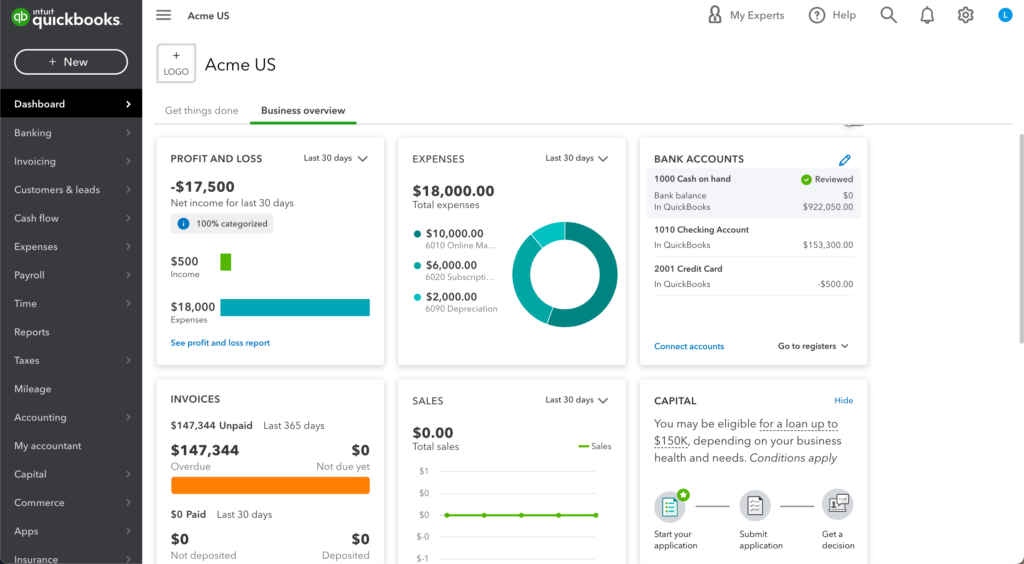
QuickBooks Online and QuickBooks Self-Employed connect directly to financial institutions to pull transaction data. For personal use, these features translate into specific household applications:
- Automated Bank Feeds: Link checking accounts, savings accounts, and credit cards to stream transactions into a single dashboard.
- Expense Categorization: Sort spending into custom categories like housing, dining out, and travel.
- Receipt Capture: Snap photos of paper receipts using a mobile device to attach them to specific ledger entries.
- Cash Flow Reports: Generate profit and loss statements or spending trends over monthly and yearly intervals.
While these features sound useful, they mimic standard capabilities found in dedicated personal finance tools. The main distinction lies in QuickBooks' underlying architecture, which uses accrual-based business accounting principles rather than cash-flow household budgeting. For another perspective on this event, see the latest update from Reuters.
The Financial Reality: Pricing vs. Utility
Subscription costs make QuickBooks a hard sell for personal budgets. Standard QuickBooks Online plans start north of thirty dollars a month, while business-tier options climb much higher. Over a single year, subscription fees exceed four hundred dollars just to track personal expenses.
Paying this amount creates a negative return on investment for standard household budgeting. QuickBooks lacks native, forward-looking budgeting envelopes or debt payoff calculators found in consumer-focused apps. You pay business prices for professional tools like vendor management and accounts payable, features that serve no purpose when managing personal wealth or family expenditures.
When Personal Use Actually Makes Sense
A few specific scenarios justify using QuickBooks for non-business tracking:
- Single-Member Rental Properties: Landlords managing one or two rental properties often use QuickBooks to separate personal assets from tenant rent, maintenance receipts, and property taxes.
- Side Hustles Mixed With Personal Accounts: Freelancers who struggle to separate personal and business spending temporarily use QuickBooks to sort blended transactions before handing records to a CPA.
- Complex Estate or Trust Management: Individuals managing multi-asset personal estates require rigorous ledger tracking that resembles corporate accounting more than standard budgeting.
Core Shortcomings for Household Finances
Trying to force QuickBooks into a personal finance workflow exposes several frustrating limitations.
Missing Debt and Savings Goal Tools
Consumer apps focus heavily on net worth tracking, debt snowball methods, and specific savings milestones. QuickBooks focuses entirely on revenue, expenses, and tax liabilities. It won't help you plan a mortgage payoff or track retirement account allocations with any real depth.
Steep Learning Curve
Business software assumes familiarity with accounting terminology. Reconciling accounts, managing journal entries, and fixing miscategorized bank rules require a basic understanding of bookkeeping. Household budgeters usually prefer intuitive dashboards that require zero setup.
Overkill on Tax Features
While QuickBooks Self-Employed helps calculate quarterly estimated taxes and Schedule C deductions, these tools only apply to self-employment income. W-2 employees derive zero tax advantage from the platform, rendering its most touted features completely useless.
Stronger Alternatives for Personal Finance
Instead of paying high monthly fees for business software, several alternatives handle personal wealth management with greater precision.
Dedicated Personal Finance Apps
Platforms like Empower offer free net worth tracking, investment portfolio analysis, and retirement calculators. For everyday budgeting, apps like YNAB (You Need A Budget) or Monarch Money provide superior envelope-style budgeting and goal-setting frameworks designed explicitly for households.
Spreadsheet Templates
Many users prefer building custom trackers in Microsoft Excel or Google Sheets. Spreadsheets cost nothing, offer absolute privacy, and allow complete customization of categories, charts, and formulas without subscription lock-in.
Frequently Asked Questions
Can I connect a personal bank account to QuickBooks?
Yes, QuickBooks allows you to link personal checking and credit card accounts to import transaction histories. However, Intuit's terms and subscription models lean heavily toward business use.
Is there a free version of QuickBooks for individuals?
No permanent free tier exists for full QuickBooks Online software, though Intuit occasionally offers limited-time free trials.
Can QuickBooks help me create a household budget?
While you can run basic spending reports, QuickBooks does not feature a traditional household budgeting interface where you assign specific dollar limits to spending categories ahead of time.
Is QuickBooks tax-deductible if used for personal finance?
No. Under tax laws in the United States and Canada, software subscription costs are only deductible if incurred strictly to produce business income. Using it for personal household tracking makes the expense non-deductible.



