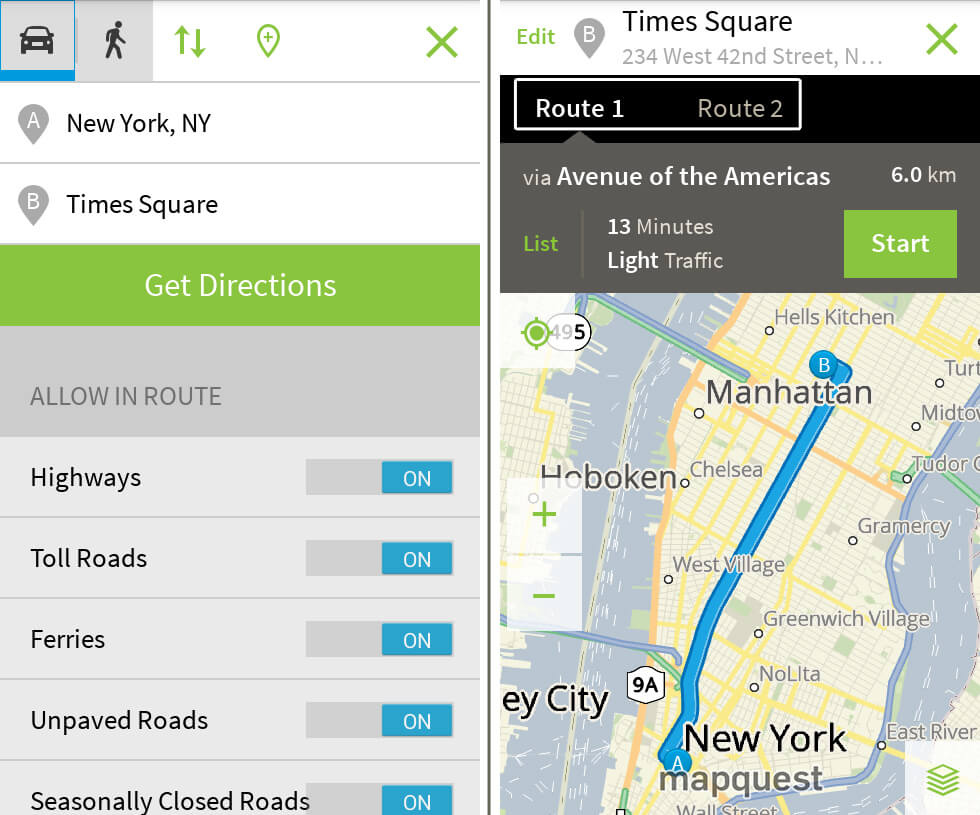
Finding your way through heavy traffic or mapping out multi-stop errands requires tools that handle real-time conditions without adding friction to your drive. MapQuest has evolved from a desktop pioneer into a modern application offering turn-by-turn guidance, multi-stop route optimization, and integration with platforms like Apple CarPlay and Android Auto.
If you're evaluating how MapQuest handles smart routing, traffic analysis, and everyday trip planning, you'll want to look past the basic interface. Modern mapping software relies on dynamic data layers to adjust your path on the fly, helping you avoid congestion, road closures, and unexpected delays before they stall your commute.
Core Routing and Optimization Capabilities
At the heart of any navigation app is its ability to find the most efficient path from point A to point B. MapQuest allows users to build routes manually or import multiple stops for complex errands or small business deliveries.
When building a multi-stop route, you can input up to 26 addresses. This capacity exceeds what standard consumer mapping tools often allow per single trip. To make the most of this feature, you can toggle the automatic reordering setting. This function analyzes distances to arrange your stops in an order that minimizes total drive time or distance.
- Shortest Time vs. Shortest Distance: You can choose whether you want the app to prioritize the absolute fastest route based on current traffic speeds or the shortest physical mileage.
- Custom Avoidances: If you want to bypass toll roads, major highways, or ferries, you can set these preferences in the routing options before you hit start.
- Desktop-to-Mobile Sync: You can plan complex trips on a desktop browser and access the saved route instantly on your mobile device when you're ready to leave.
Traffic Monitoring and Real-Time Adjustments
Smart routing depends heavily on live data feeds to react to accidents, construction, and gridlock. MapQuest incorporates real-time traffic updates directly into its active navigation screens.
As you drive, the app monitors conditions ahead. If a major incident blocks your path, the system suggests alternative corridors to keep you moving. While driving on supported systems like CarPlay or Android Auto, incident reports and alerts appear right on your dashboard screen so you don't have to look down at your phone.
For drivers who want extra environmental awareness, feature layers allow you to toggle specific overlays on the map interface. For instance, you can check for local electric vehicle charging stations or monitor transit schedules if you're combining driving with public transportation.
Practical Setup and Configuration Tips
Getting accurate directions requires a few proactive steps during the planning phase. Small details can prevent mapping errors while you're behind the wheel.
- Verify Address Data: Always include complete zip codes when entering destinations manually to prevent the geocoder from dropping a pin in the wrong neighborhood.
- Utilize "Leave By" Times: If you need to arrive at a destination by a specific hour, use the schedule feature to let the system estimate your departure time based on predicted traffic patterns.
- Manage Battery Usage: Extended navigation sessions can drain mobile batteries quickly. Adjusting background app refresh settings helps preserve power during long trips.
- Save Frequent Locations: Store recurring destinations—such as workplaces or family members' homes—in your account to cut down on typing while preparing for routine trips.
You can check out developer documentation on the MapQuest Developer Portal to learn more about how routing requests are processed. For official app downloads and updates, visit the Apple App Store or the Google Play Store.
Frequently Asked Questions
How many stops can I add to a single MapQuest route?
You can plan a route with up to 26 stops. If you need to visit more locations than that, you'll need to split your trip into multiple separate routes.
Does MapQuest work with Apple CarPlay and Android Auto?
Yes, MapQuest supports both platforms, letting you view turn-by-turn directions, search for gas stations along your route, and receive traffic alerts directly on your car's built-in display.
Can I avoid toll roads using MapQuest?
Yes, you can toggle settings to avoid tolls, highways, and ferries before calculating your final route.
Is MapQuest free to use?
Yes, the core navigation, mapping, and route-planning features are free, supported by ads within the interface.



