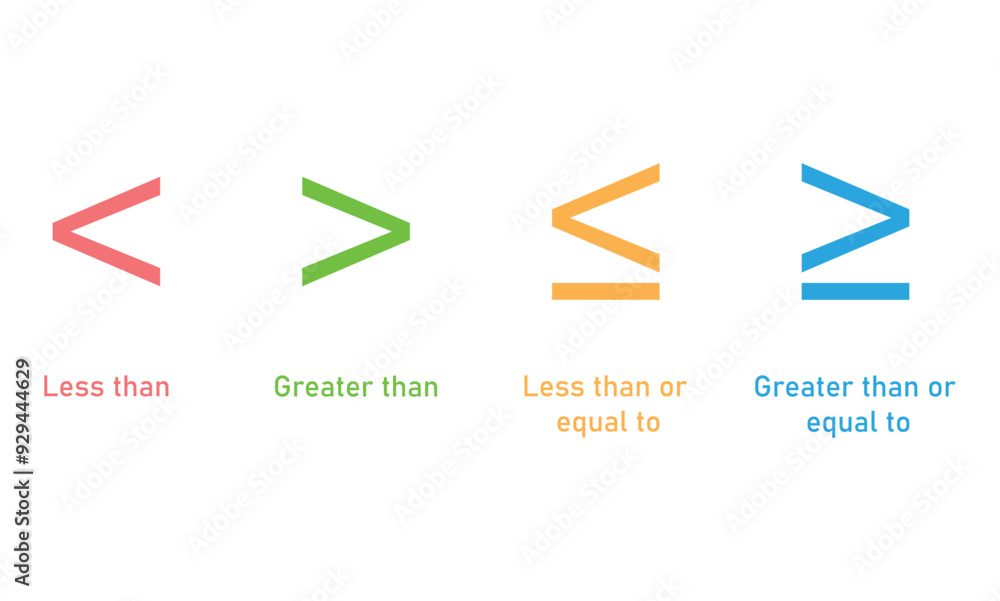
The less than or equal to sign ($\le$) is a fundamental relational operator used across mathematics, statistics, and programming. It indicates that a given value is either strictly smaller than another value or exactly equal to it. When you analyze data ranges, write conditional statements in code, or set numerical boundaries, this symbol defines where a limit begins or ends.
Understanding how to read, write, and type this character properly ensures clarity in both technical documents and everyday spreadsheets. Beyond its basic mathematical definition, the symbol appears across software applications, database queries, and keyboard shortcuts that speed up your daily workflow.
What is the Less Than Or Equal To Sign?
The symbol combines two distinct graphical elements: the traditional "less than" caret ($<$) and a horizontal line representing equality ($=$). Together, they form $\le$. In Unicode, it is represented as U+2264. In HTML documents, you can code it using the character entity ≤ or the numeric reference ≤.
In any inequality expression, the pointed end of the symbol faces the smaller value, while the open side faces the larger value. For example, writing $x \le 10$ means that $x$ can be any number equal to ten or any number lower than ten, such as $9.9$, $0$, or $-4$.
Strict Versus Non-Strict Inequalities
To understand the less than or equal to sign, it helps to contrast it with strict inequalities:
- Strict Inequality ($<$): The value on the left must be strictly smaller than the value on the right. If $x < 10$, then $10$ is excluded from the solution set.
- Non-Strict Inequality ($\le$): The value on the left can be smaller than or equal to the right. If $x \le 10$, $10$ is included as a valid solution.
This inclusion of the boundary condition makes the symbol vital in real-world scenarios where thresholds are absolute limits rather than open-ended targets.
Mathematical and Real-World Applications
You encounter this symbol frequently in both academic equations and practical scenarios. Here are the primary contexts where it governs logic and limits:
- Budgeting and Finance: Expenses must remain within your available balance. If your monthly budget is $$1,500$, your total spending $s$ is expressed as $s \le 1500$.
- Engineering and Manufacturing: Tolerances dictate that a manufactured part must meet specific size constraints. A steel rod with a target length of $100\text{ mm}$ might require length $L$ to satisfy $99.5 \le L \le 100.5$.
- Data Filtering and Statistics: When sorting data sets, analysts use conditions like score $\le 50$ to isolate failing grades or lower-quartile metrics.
How to Type the Less Than Or Equal To Sign
Depending on your operating system or software environment, several methods exist for inserting the symbol into your text.
Keyboard Shortcuts and Operating System Codes
- Windows (Alt Code): Hold down the
Altkey and type8804on your numeric keypad, then releaseAlt. Alternatively, useAlt + 243on some layouts. - Mac: Press
Option + ,(the Option key combined with the comma key) to generate $\le$ instantly in most text fields. - Microsoft Word: Type the Unicode hex code
2264and immediately pressAlt + X.
HTML and Markdown Formatting
If you are building web pages or editing documentation, use standard entity codes so browsers render the symbol correctly across all devices:
<!-- HTML Entity -->
≤
<!-- Decimal Numeric Reference -->
≤
In Markdown environments, you can also render it using standard LaTeX math blocks if the platform supports it, such as writing $x \le y$.
Usage in Programming Languages
Computer science relies heavily on conditional logic. Because standard keyboards lack a dedicated single-key $\le$ symbol, programming languages developed textual equivalents.
- Python, JavaScript, C++, Java, and Ruby: Use the combined characters
<=. For example,if x <= 5:executes the indented code block only if $x$ is less than or equal to five. - SQL Queries: Database management systems use
<=withinWHEREclauses to filter rows, such asSELECT * FROM inventory WHERE stock <= 10;. - R and MATLAB: Both statistical environments use
<=for element-wise comparisons across vectors and matrices.
Using a single = instead of <= is one of the most common syntax errors in programming, as a single equals sign typically performs variable assignment rather than logical comparison.
Common Mistakes to Avoid
When working with inequalities, certain errors frequently trip up students and professionals alike:
- Confusing the Direction: Reversing the symbol turns $x \le 5$ into $x \ge 5$, completely inverting your logical condition or data filter. Always remember that the pointy end bites the smaller number.
- Excluding Boundary Values: In programming loops, using
<instead of<=often leads to off-by-one errors where the final item in a list or array is accidentally omitted from execution. - Using Incorrect Font Glyphs: Avoid typing
<followed immediately by an underscore or hyphen (like<-), which does not render as a proper mathematical symbol in professional typography. For official styling guidelines, consult the Unicode Consortium standards.
Frequently Asked Questions
What is the difference between $\le$ and $<$?
The main difference is the inclusion of equality. The less than sign ($<$) strictly excludes the compared value, whereas the less than or equal to sign ($\le$) includes that value as a valid outcome.
How do I type $\le$ on a smartphone?
On iOS and Android keyboards, switch to the numerical and symbol keyboard view (.?123), then tap and hold the < key to reveal secondary options, where the $\le$ symbol will pop up for selection.
Can I use <= in standard mathematical handwriting?
No. In handwritten mathematics or formal paper publishing, you should always draw the traditional single symbol combining a sideways V with a flat baseline bar ($\le$), rather than typing two separate programming characters. For more details on mathematical typesetting standards, visit the World Wide Web Consortium.
Why do programming languages use <= instead of $\le$?
Early computer keyboards featured a limited ASCII character set that did not include mathematical symbols. Programmers combined the less-than symbol and the equals sign as a logical substitute that remains universally understood by compilers today.


