Power efficiency dictates the modern desktop and mobile landscape. When you look closely at silicon design, the real battle isn't just about raw speed or peak benchmark scores; it's about how much performance a chip delivers per watt of electricity. Both Intel and AMD have radically shifted their design philosophies, moving away from brute-force voltage scaling toward sophisticated heterogeneous layouts and advanced node technologies.
AMD relies heavily on its modular chiplet design and power-conscious Zen architecture, historically maintaining a comfortable lead in energy thriftiness across both mobile and multi-threaded desktop workloads. Intel, meanwhile, has fought back through its Core Ultra generation, adopting hybrid layouts that pair performance cores with low-power island efficiency cores. Understanding how these architectural differences translate into real-world electricity draw, heat output, and battery life helps clarify which platform suits your workflow.
The Architectural Shifts: Chiplets vs Monolithic Tiles
To understand why power efficiency varies so dramatically between these two manufacturers, you have to examine how their processors are built. AMD pioneered the mainstream shift toward chiplet-based designs. By separating the core compute dies from the centralized input-output (I/O) die, AMD manufactures only the tiny core complexes on cutting-edge, expensive nodes while keeping peripheral logic on cheaper, denser older nodes. This minimizes wasted silicon area and significantly cuts down idle and sub-load power consumption.
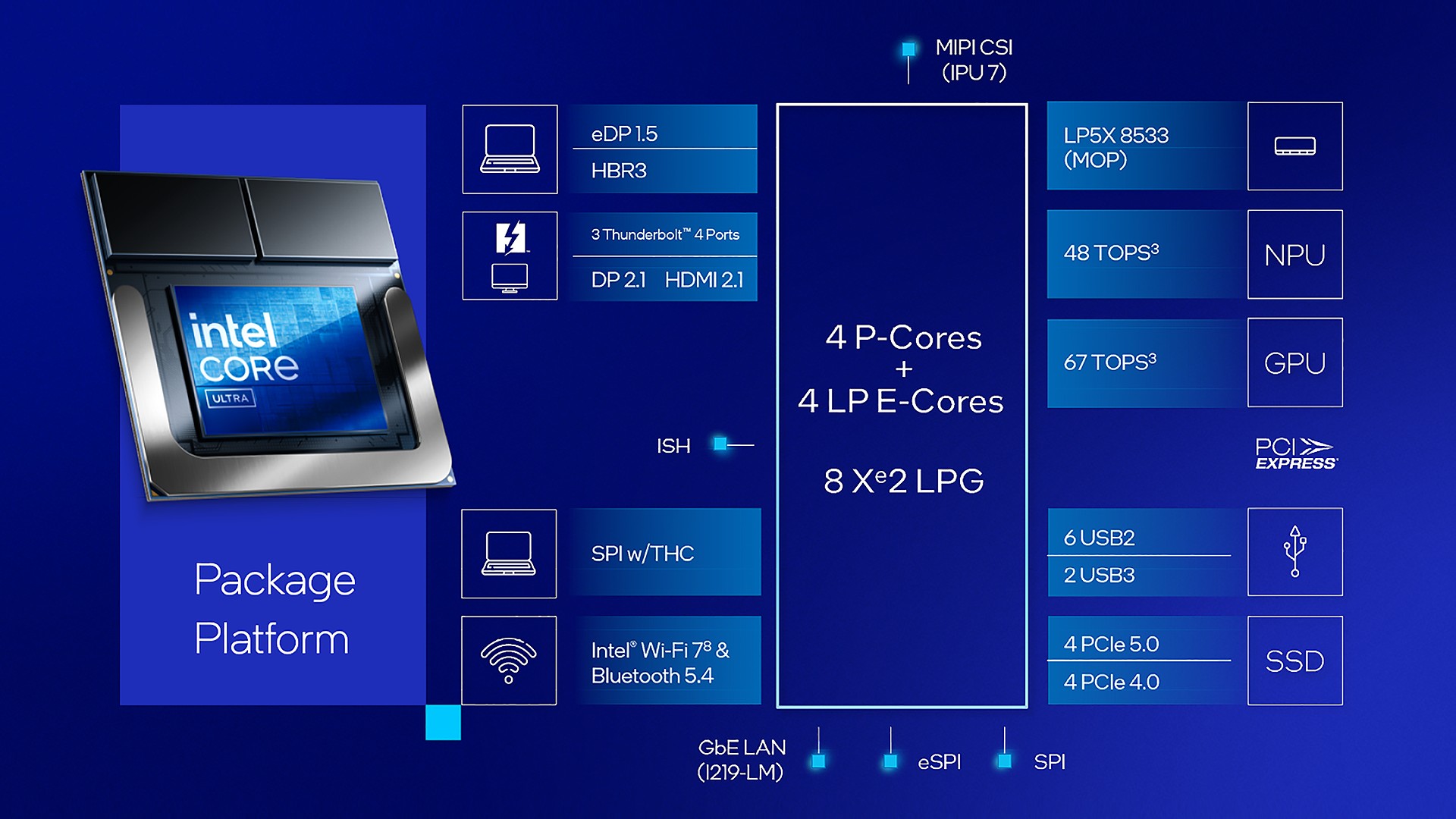
Intel traditionally favored monolithic dies, which suffered from high idle power draws because the entire physical slab of silicon needed to remain active even during low-demand tasks. With recent architectural overhauls, Intel adopted a tiled approach akin to tile-based packaging. They split graphics, SoC functions, and compute engines onto separate tiles. However, coordinating data movement across multiple tiles introduces latency overhead, which requires careful power gating to prevent idle leakage.
- AMD Zen Architecture: Focuses on dense core scaling with unified L3 cache pools that minimize interconnect power taxes during sustained multi-core loads.
- Intel Core Ultra Layout: Employs disaggregated tiles alongside dedicated low-power island efficiency cores designed to handle background tasks without waking heavy performance clusters.
Performance Per Watt Under Sustained Workloads
Peak performance figures printed on a spec sheet mean little if a processor throttles within seconds due to thermal overload. In professional rendering, video encoding, and heavy compilation tasks, efficiency determines whether a workstation stays whisper-quiet or screams under a heavy cooling load.
AMD's desktop and mobile parts consistently extract more work per joule during multi-threaded saturation. Because the Zen core architecture achieves high instruction-per-clock (IPC) figures at lower voltage thresholds, it avoids the aggressive voltage walls that Intel historically hit when pushing past 5.0 GHz. Intel has reined in its maximum power limits compared to previous generations, closing the gap significantly. Yet, when both brands are pinned at maximum multi-core loads, Intel systems still routinely demand higher peak wattage to sustain equivalent throughput.
For professional creators, this distinction dictates long-term operating costs and thermal management. A chip that draws 100 watts less under a rendering load requires less aggressive liquid cooling, reducing overall system noise and component wear over years of heavy use.
Mobile Efficiency and Battery Longevity
In laptops, power efficiency dictates usability away from the wall outlet. Here, the architectural divergence yields starkly different user experiences. AMD's Ryzen mobile processors excel at scaling down to extremely low wattage states during web browsing, document editing, and media playback.
Intel's recent mobile push incorporates specialized low-power island cores positioned outside the main compute ring. When you stream video or manage background sync tasks, the main performance cores shut down completely, leaving the low-power islands to handle the thread overhead. This strategy yields excellent idle and light-load battery life in ultra-thin chassis, rivaling traditional mobile leaders.
However, under mixed productivity loads involving constant context-switching between video calls, code compilation, and browser tabs, AMD's integrated power management firmware often handles dynamic frequency scaling with fewer voltage spikes.
Common Efficiency Pitfalls in Custom Builds
Many users accidentally neuter their processor's efficiency through improper BIOS configurations or component matching. Avoiding these frequent mistakes ensures your hardware runs cool and draws only the power it actually needs.
- Leaving motherboard power limits uncapped: Many third-party motherboard vendors remove Intel and AMD default power delivery limits out of the box, forcing chips to pull dangerous amounts of extra wattage for marginal percentage gains in benchmarks.
- Neglecting low-load idle tuning: Failing to enable proper operating system power plans or modern standby states prevents the CPU from dropping into deep sleep sleep-states (C-states).
- Using mismatched memory kits: Running high-frequency RAM with loose sub-timings forces the memory controller and interconnect fabric to pump extra voltage into the system agent, raising baseline idle power consumption.
For official specifications and architectural whitepapers, you can review technical documentation directly from Intel and AMD.
Frequently Asked Questions
Which brand currently offers better power efficiency?
AMD generally maintains an edge in multi-threaded power efficiency per watt, particularly in desktop processors and demanding mobile workloads. Intel has made massive strides with its disaggregated core designs and low-power island tiles, but still tends to draw more power at absolute peak performance tiers.
Does power efficiency affect gaming performance?
Directly, yes. Processors that waste less energy on thermal dissipation can maintain higher boost clocks for longer periods without hitting thermal limits. Additionally, processors with large integrated caches—such as AMD's 3D V-Cache variants—reduce memory subsystem requests, saving electrical energy while boosting frame-time stability in games.
Do power-efficient CPUs run cooler?
Generally, lower power consumption correlates with less heat output, which translates directly to quieter fan profiles. However, thermal density also matters; a very small chiplet can concentrate heat in a tight spot even if its total wattage draw is modest, requiring a well-mounted cooler to transfer that energy effectively.
How do power limits affect everyday desktop use?
Out-of-the-box motherboard settings often push chips past their rated thermal design power (TDP) to squeeze out minor benchmark gains. Tuning these limits manually in your BIOS often drops temperatures significantly with almost zero noticeable loss in daily desktop responsiveness or application speed.



