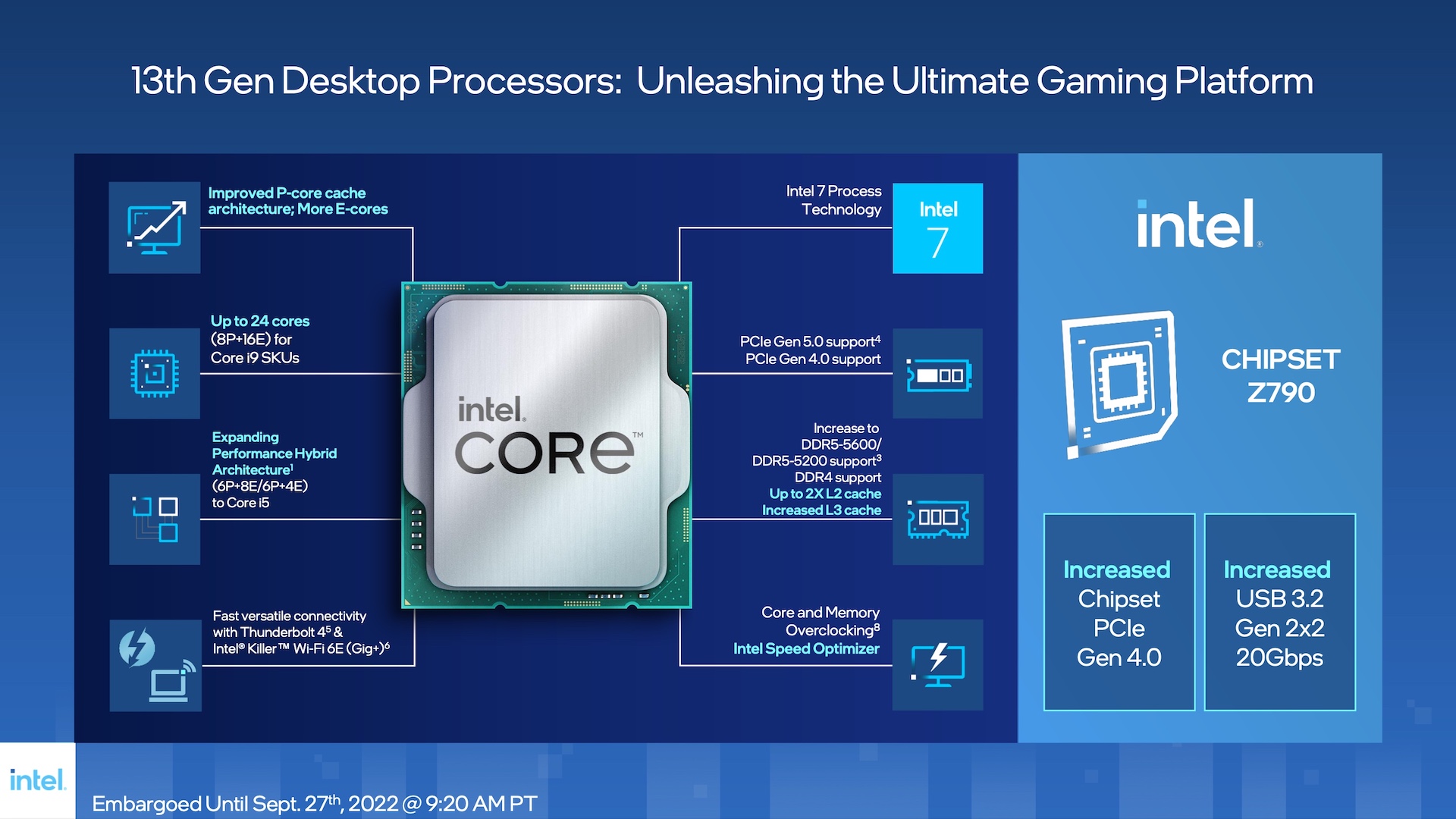
When you're configuring a high-end desktop or workstation, choosing between an Intel Core i7 and an Core i9 processor often feels like splitting hairs. Both sit at the top tier of consumer silicon, share matching performance core counts on recent architectures, and demand serious thermal solutions. However, the Core i9 commands a steep price premium that doesn't always translate to noticeable gains in everyday tasks.
If you're building a system primarily for gaming or standard office productivity, an Intel Core i7 delivers nearly identical real-world performance to its more expensive sibling while leaving room in your budget for a better graphics card. On the other hand, if your daily routine involves heavy video rendering, 3D simulation, or massive multi-threaded compilation, the extra efficiency cores and cache packed into a Core i9 can justify the extra expense. Let's break down where the differences actually matter and how to choose the right chip for your workload.
Architectural Realities: What You're Actually Buying
To understand why the price gap exists, you have to look past marketing terms and examine the die layout. Intel builds both the Core i7 and Core i9 within the same generation using identical microarchitecture. Both tiers typically feature eight Performance-cores (P-cores)—the heavy lifters that handle high-frequency gaming tasks and single-threaded responsiveness.
The divergence happens in the Efficiency-core (E-core) count, cache size, and maximum boost frequencies:
- Core Counts: While both share eight P-cores, the Core i9 includes a higher count of E-cores (pushing total core counts up to 24 on recent generations compared to 20 on the i7).
- Cache Pool: Core i9 processors offer a larger Intel Smart Cache pool (often 36MB compared to 33MB on the i7), which speeds up data retrieval during repetitive instructions.
- Clock Speeds: The i9 features slightly higher out-of-the-box turbo frequencies, letting it squeeze out peak performance when thermal limits allow.
Despite these differences, both processors share identical maximum power consumption thresholds (such as 253W power limits on 14th-generation parts), meaning they generate comparable amounts of heat and require robust 360mm liquid cooling setups to prevent throttling.
Gaming Performance: The Diminishing Returns Reality
If your primary motivation for building a high-end PC is gaming, the Core i9 is rarely a sensible purchase. Modern PC games rely heavily on single-core speed and the performance of your graphics card rather than raw multi-core scaling.
Because both the Core i7 and Core i9 share the exact same number of high-performance P-cores, their frame rate output in games is remarkably close. Independent hardware benchmarks show that the Core i9 typically leads the i7 by only about two percent in 1080p gaming. Once you step up to 1440p or 4K resolutions, your graphics card becomes the primary bottleneck, rendering the tiny performance gap between the two processors completely invisible.
Putting that extra money toward an upgraded GPU—such as moving from an RTX 5070 Ti to an RTX 5080—will yield a massive, noticeable jump in visual fidelity and frame rates. Buying an i9 for a pure gaming rig means paying more for performance you will never see on screen.
Content Creation and Professional Workloads
Where the Core i9 earns its keep is in multi-threaded productivity software that can saturate every available core simultaneously. If your livelihood depends on professional workflows, the performance delta becomes much clearer.
- Video Editing and Exporting: Applications like Adobe Premiere Pro and DaVinci Resolve utilize extra cores during timeline rendering and background exports. The i9 delivers a measurable 9 to 12 percent boost in multithreaded tasks, shaving precious minutes off long exports.
- 3D Rendering and Simulation: Software like Blender, Cinema 4D, and CAD suites scale almost linearly with core count. Every extra E-core on the i9 contributes to finishing render passes faster.
- Software Compilation: Compiling massive codebases or running multiple local virtual machines benefits directly from the expanded thread capacity and larger cache.
Even here, context matters. If you edit a single video once a month, an i7 is more than fast enough. If you render 4K video projects every single day, the time saved by a Core i9 adds up quickly.
Power, Heat, and Platform Ecosystems
Upgrading to a flagship processor affects more than just your initial purchase receipt. Both chips push modern silicon to its absolute limits, creating specific system requirements:
- Thermal Management: Do not expect to cool either of these chips with a budget air cooler. Both the i7 and i9 require high-end cooling solutions, preferably a 360mm all-in-one liquid cooler, to sustain high boost clocks.
- Power Supply (PSU): Under maximum load, both processors can draw over 250 watts. You'll need a reliable 850W or 1000W power supply from a reputable brand to maintain system stability alongside a powerful modern GPU.
- Motherboard Quality: To feed clean power to these heavy-hitting CPUs, invest in a motherboard with a robust VRM (Voltage Regulator Module) thermal design, typically found on mid-to-high-end Z-series chipsets.
For a deeper dive into platform compatibility and motherboard selection guidelines, check out the official Intel ARK database for precise technical specifications on socket types and power delivery.
Common Mistakes When Choosing Between i7 and i9
Many system builders fall into traps driven by spec-sheet marketing rather than practical utility. Avoid these common missteps:
- Assuming more cores always makes games faster: Games do not know what to do with 24 cores. They care about IPC (Instructions Per Cycle) and clock speed, which are nearly identical between these matching generations.
- Ignoring the total system budget: Spending an extra chunk of change on an i9 often forces compromises elsewhere, like buying slower RAM, a smaller SSD, or a weaker power supply.
- Overlooking cooling costs: Budgeting for an i9 means you also have to budget for premium cooling hardware to keep it from thermal throttling.
Frequently Asked Questions
Is the Core i9 noticeably faster for everyday multitasking?
No. For web browsing, office suites, and background music streaming, an i7 already provides more than enough overhead. You won't notice any speed difference in desktop responsiveness between the two.
Do I need to buy a special motherboard for a Core i9?
While an i9 works in the same motherboards as an i7 (such as Intel's Z-series boards), you should prioritize a board with strong VRM cooling to handle the sustained power draws without overheating.
Is it worth upgrading from a current-generation i7 to an i9?
If you already own a modern i7, upgrading to an i9 within the same generation is a waste of money. The performance gain in your specific applications will rarely justify the cost of buying a brand-new processor.
Does streaming gameplay require a Core i9?
Not necessarily. While encoding video via the CPU eats up resources, modern dedicated graphics cards feature hardware encoders (such as NVIDIA's NVENC) that handle streaming effortlessly without taxing your main processor.



