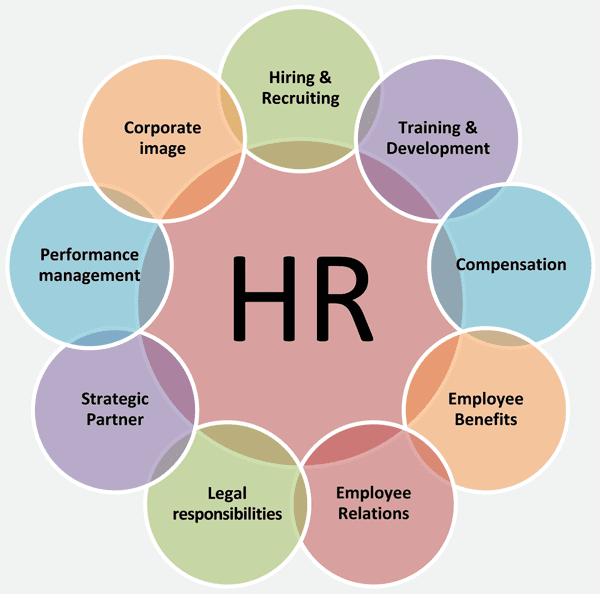
Managing people operations efficiently separates growing businesses from stagnant ones. When paperwork multiplies across disparate spreadsheets, hiring pipelines, and payroll calculators, operations stall. An HR umbrella brings every administrative workflow under a single software roof.
Adopting an integrated HR platform eliminates redundant data entry and manual errors. Instead of jumping between standalone tools for candidate tracking, tax withholding, and time-off requests, teams manage everything from one unified dashboard. This article explores how modern HR umbrella platforms work, what features matter most, and how to select the right system for your organization.
What is an HR Umbrella?
An HR umbrella refers to a centralized software architecture that coordinates core human resource functions. Rather than purchasing separate point solutions for recruiting, payroll processing, benefits enrollment, and performance reviews, companies deploy a single system where employee data flows automatically between departments.
When a candidate accepts an offer, their profile migrates instantly from the applicant tracking module into onboarding paperwork, payroll setup, and benefits enrollment without re-typing details. This connectivity prevents the data silos that commonly plague growing teams.
Core Components of an Integrated HR Platform
A complete HR umbrella solution typically incorporates several interconnected modules:
- Applicant Tracking: Centralizes job postings, resume parsing, interview scheduling, and candidate pipeline stages.
- Onboarding Workflows: Automates document collection, tax form verification, digital signatures, and orientation task checklists for new hires.
- Payroll and Time Tracking: Calculates wages, manages deductions, handles tax filings, and logs hourly attendance or paid time off.
- Benefits Administration: Manages health insurance elections, retirement contributions, and open enrollment periods.
- Performance Management: Stores review cycles, goal-tracking metrics, and feedback notes in employee files.
Key Operational Benefits
Consolidating human resource tools delivers measurable improvements to operational efficiency and employee experience.
Reduction in Administrative Overhead
Manual data entry consumes hours of HR staff time each week. When employee updates—such as address changes or direct deposit adjustments—sync automatically across payroll and benefits systems, administrative error rates drop significantly. Teams redirect those saved hours toward strategic initiatives like workforce planning and employee retention programs.
Enhanced Compliance Tracking
Employment regulations vary by jurisdiction, and missing a filing deadline or misclassifying a worker creates legal exposure. Centralized platforms maintain audit trails, track mandatory training completions, and apply updated tax tables automatically. According to the U.S. Small Business Administration, maintaining accurate employment records and adhering to federal standards protects businesses from costly labor disputes.
Data-Driven Decision Making
Fragmented tools make it difficult to spot trends in turnover, compensation equity, or department productivity. An integrated platform generates real-time reports across all employee lifecycle stages. Leadership teams can analyze absence patterns, overtime costs, and recruiting bottlenecks using live dashboards instead of waiting for end-of-month spreadsheets.
Evaluating and Selecting the Right System
Choosing an HR umbrella requires a structured assessment of your company size, internal technical capability, and budget constraints.
Audit Existing Pain Points
Start by documenting where your current administrative bottlenecks occur. If onboarding takes five days because paperwork is physical, prioritize a platform with robust digital signature workflows. If payroll errors happen frequently due to manual timesheet imports, focus on systems with integrated time-tracking hardware or mobile clock-in features.
Define Scalability Requirements
A software package that fits a fifty-person startup might lack the permission controls or multi-state tax handling required for an enterprise with five hundred employees. Check whether the vendor charges per active user, offers tiered feature pricing, or requires expensive implementation consultants for custom configurations.
Test Integration Capabilities
No HR platform operates in complete isolation. Your new umbrella solution must connect cleanly with existing accounting software, IT provisioning tools, and communication channels. Request a sandbox demo to test data exports and API connections before signing long-term vendor agreements.
Common Implementation Mistakes to Avoid
Deploying new software across an entire organization introduces friction if mismanaged. Watch out for these frequent pitfalls during rollout:
- Skipping Change Management: Announcing new software a week before launch leaves managers and employees unprepared. Provide short video tutorials and dedicated Q&A sessions early.
- Migrating Messy Data: Importing incomplete employee records or outdated salary figures into a new platform corrupts reports from day one. Clean up historical data files before migration begins.
- Over-Customizing Workflows: Trying to force every legacy paper form into a digital custom field creates an overly complex user interface. Stick to standard best-practice templates whenever possible.
Frequently Asked Questions
How long does it take to implement an HR umbrella platform?
Implementation timelines vary based on company size and data complexity. Small teams with under fifty employees often complete setup in two to four weeks. Enterprise organizations with complex legacy migrations require three to six months for complete rollout.
Do small businesses need an integrated HR platform?
Even teams with fewer than twenty employees benefit from centralization. Automated payroll tax calculations and digital onboarding reduce compliance risks and save hours of administrative work each month.
Can HR umbrella software handle contractor payments alongside employees?
Most modern platforms support mixed workforces, allowing companies to manage W-2 employees and 1099 independent contractors within the same billing and reporting structure.
What is the difference between an HR umbrella and a PEO?
An HR umbrella is software your company owns and operates to manage internal workflows. A Professional Employer Organization (PEO) involves co-employment, where the PEO acts as the employer of record for tax and benefits purposes.


