Navigating peer-to-peer payment platforms safely requires understanding how digital fraud evolves. Fraudsters frequently rely on manufactured payment confirmations and doctored transaction logs to trick users into handing over goods or funds. Recognizing these tactics protects your balance from disappearing.
When someone sends a digital payment proof via text, email, or a messaging app, it's easy to assume the transaction is complete. However, bad actors routinely use third-party screenshot generators and edited images to simulate successful transfers on Cash App. If you rely on a screenshot rather than checking your actual app balance, you risk losing items or money.
The Anatomy of Fake Payment Proof
Fraudsters exploit the trust people place in mobile payment screenshots. In peer-to-peer marketplaces, a buyer might claim they sent funds for an item, attaching an image showing a successful transfer.
Several technical indicators separate real alerts from manufactured ones. Real notifications arrive via official push mechanisms built into your device operating system and log immediately inside the application interface. Fabricated receipts often display font misalignments, incorrect spacing around currency symbols, or outdated app layout elements. To see the complete picture, we recommend the detailed analysis by The New York Times.
- The Balance Test: A legitimate transfer updates your spendable balance or appears instantly in your transaction history tab. If a user insists money was sent but your activity feed shows nothing, stop the transaction immediately.
- The Pending Trap: Scammers often claim a transfer is delayed because the recipient needs to upgrade their account type or pay a small fee to unlock funds. Cash App does not require a fee or business upgrade to receive standard peer-to-peer payments.
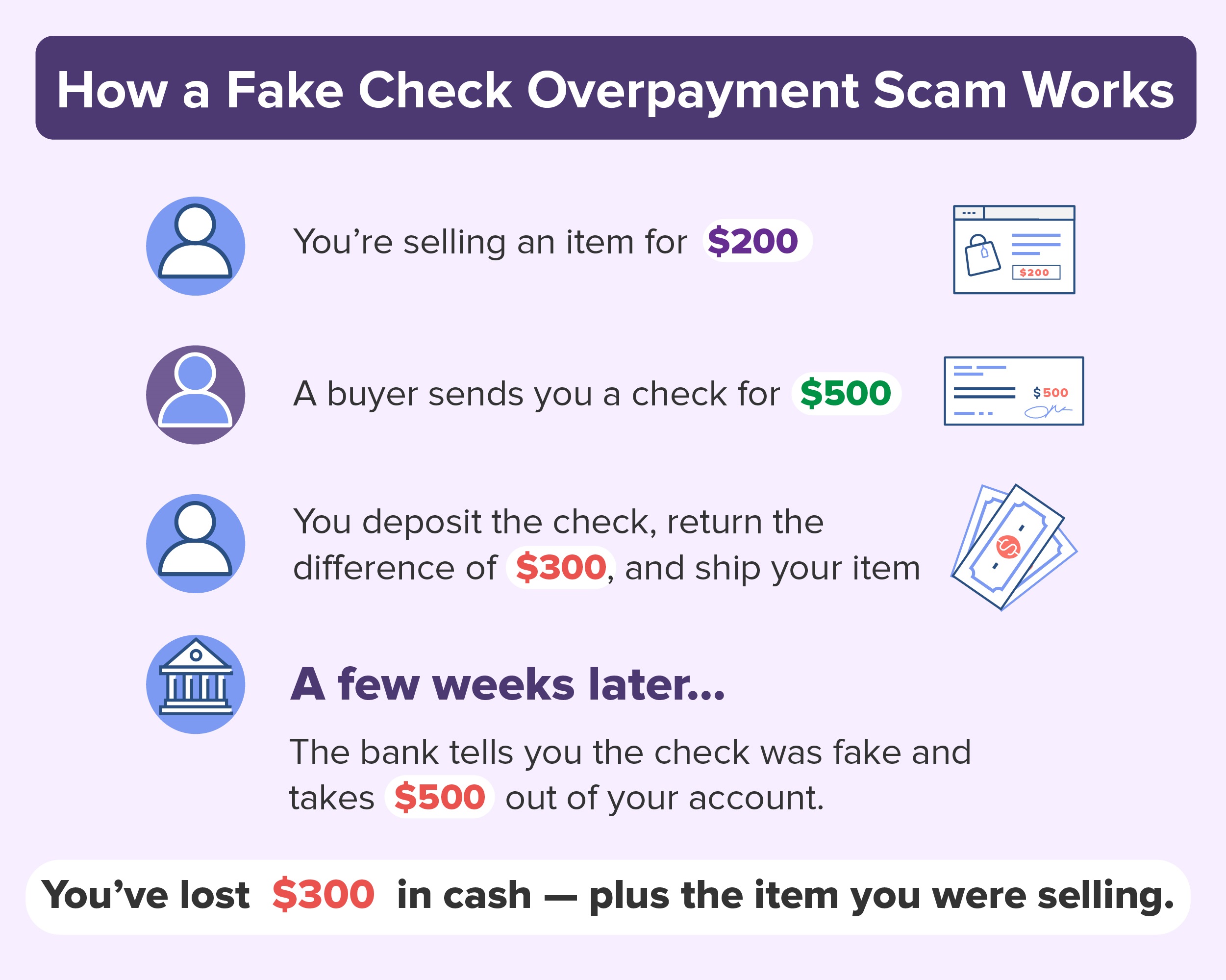
- Overpayment Schemes: A buyer intentionally overpays for an item and asks you to refund the difference via a separate transaction. The original payment then gets reversed due to being charged from a stolen card, leaving you out of pocket for the refunded amount.
Common Red Flags in Digital Transactions
Spotting malicious behavior early prevents financial loss. Fraudsters typically rely on urgency, manufactured stress, and isolation tactics to bypass your normal caution.
+-------------------------------------------------------------+
|               Warning Signs of Payment Fraud                |
+-------------------------------------------------------------+
| • Demands for immediate shipment based on screenshot proof  |
| • Requests to move conversations off secure platforms       |
| • Unsolicited texts claiming account lockouts with links    |
| • Offers involving overpayments or processing fees          |
+-------------------------------------------------------------+
When a buyer or seller refuses to use standard platform verification steps, treat the interaction as high risk. Scammers frequently invent technical glitches to explain why funds haven't registered yet, hoping you will act before checking your real account balance.
Phishing and Fake Support Lines
Another widespread vector involves malicious links distributed via SMS or search engine ads. Victims searching for customer support phone numbers often land on fraudulent pages controlled by bad actors. These fake support agents ask for PINs, sign-in codes, or remote access to your device under the guise of fixing an account security hold.
Official support channels will never ask for your sign-in code, PIN, or full debit card number over the phone or via chat. If you receive an unexpected text message warning that your account is locked, avoid clicking any embedded links. Open your mobile application directly to review your security status.
Actionable Steps to Secure Your Account
Securing your digital wallet requires proactive configuration changes. Small adjustments drastically reduce unauthorized access if your phone is misplaced or compromised.
- Enable Security Lock: Navigate to your profile settings and turn on the security lock feature, which requires your PIN or biometric confirmation for every outgoing transfer.
- Restrict Payment Requests: Configure your privacy settings to block requests from strangers or individuals outside your contact list.
- Monitor Linked Accounts: Regularly review your linked bank accounts and debit cards within the app settings to ensure no unauthorized financial instruments are attached.
- Keep Software Updated: Install official updates from the Apple App Store or Google Play to maintain access to the latest platform security patches.
What to Do If You Fall Victim
Quick action minimizes damage if you suspect you've been targeted by a fraudulent transaction.
First, secure your credentials immediately by changing your PIN and checking active login sessions. Contact your linked bank or card issuer to report unauthorized activity and request a chargeback or card freeze if funds were siphoned from your bank account.
Finally, report the incident through the official app support channels and file a formal complaint with the Federal Trade Commission to help authorities track emerging digital fraud patterns.
Frequently Asked Questions
Can someone fake a Cash App notification text?
Yes. Fraudsters use spoofing tools to send text messages that mimic official notification numbers. Never trust a text message regarding a payment or account status without verifying directly inside the application.
Does Cash App ever require a fee to receive money?
No. Standard peer-to-peer transfers are free to receive. Any claim that you must send money first to unlock a payment or upgrade your account is a scam.
What should I do if a buyer sends an overpayment?
Do not send any money back. Contact support through the app and let the platform handle any legitimate transaction reversals through official channels rather than executing a separate transfer.
How can I verify a buyer's payment in person?
Always open your own app and check your balance and activity feed. Do not look at screenshots on the buyer's phone or accept email confirmations shown on their device.



