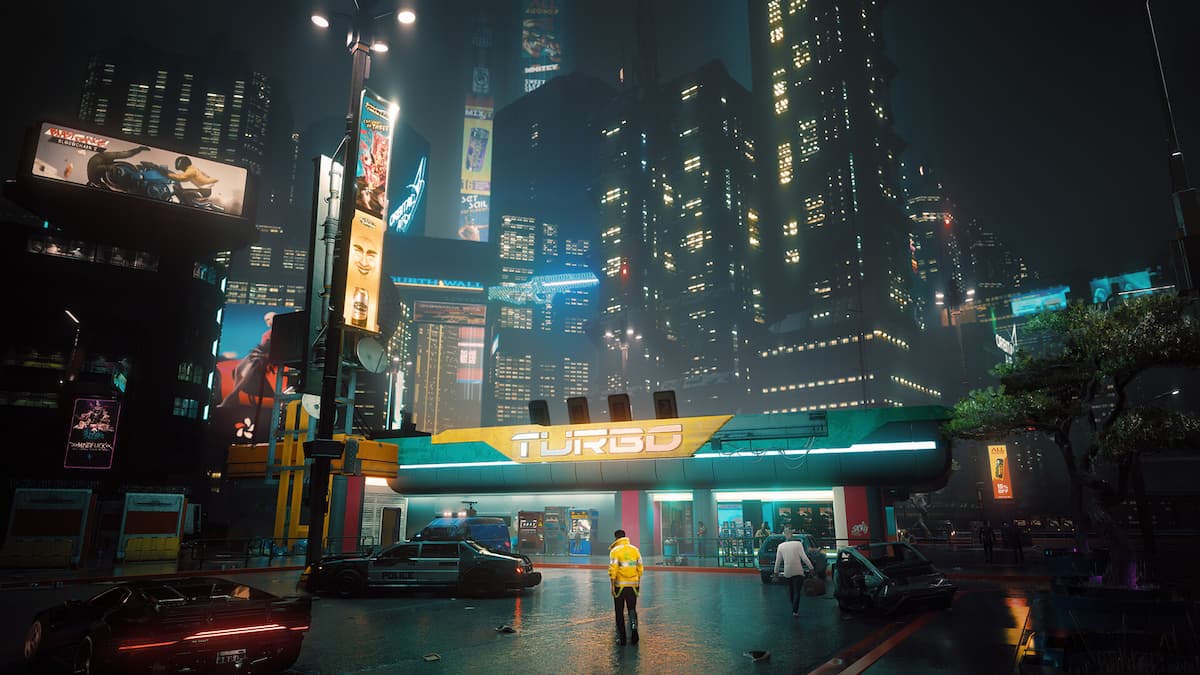
When CD Projekt Red launched the native PlayStation 5 version of Cyberpunk 2077, it washed away the bitter memory of the disastrous launch on previous-gen hardware. Stepping into Night City on Sony's current-gen console transforms the experience from a blurry, unstable mess into a vibrant, high-framerate showcase. You get two distinct graphical presets: Performance Mode, which targets a smooth 60 frames per second at a dynamic 4K resolution, and Ray Tracing Mode, which locks the frame rate to 30 frames per second while introducing local ray-traced sun shadows.
Choosing between these modes changes how Night City feels, looks, and plays. Beyond simple resolution bumps, the native PS5 port implements faster SSD loading times, denser crowds, upgraded asset streaming, and full DualSense haptic feedback support.
Performance Mode Versus Ray Tracing Mode
The core dilemma for any player booting up the game on a standard PlayStation 5 comes down to a choice between fluidity and fidelity. Performance Mode is the default choice for most players, and for good reason. It dynamically scales resolution—often resting around 1440p during heavy combat encounters and pushing closer to native 4K in less demanding open-world sectors—while maintaining a rock-solid 60 frames per second. Fast-paced gunfights, driving through dense traffic in Watson, and melee combat feel responsive and clean.
Ray Tracing Mode shifts priorities entirely. It locks your frame rate at 30 frames per second to inject local ray-traced shadows. This setting changes how ambient light reacts to geometry in indoor spaces, adding realistic soft shadows beneath furniture, characters, and vehicle barriers. However, it does not enable full ray-traced global illumination or ray-traced reflections. Puddles, glass buildings, and polished metal surfaces still rely on high-grade Screen Space Reflections (SSR). Because of this limitation, losing half your frame rate for a subtle shadow upgrade leaves Ray Tracing Mode feeling secondary for standard gameplay.
Crowd Density, Draw Distances, and World Fidelity
On the original PlayStation 4, Night City felt empty, sterile, and plagued by pop-in. The PlayStation 5 version rectifies this by elevating crowd and traffic density parameters to match high-end PC settings. Sidewalks bustle with pedestrians, and highway traffic jams feel authentic to a dense urban dystopia.
Draw distances see a massive improvement. As you hurtle down the freeway in a Quadra Turbo-R, buildings in the distance resolve geometry much faster, reducing the ugly texture loading delays that plagued early console iterations. Anisotropic filtering is also pushed higher, keeping road textures and pavement details sharp even at oblique viewing angles rather than turning into a muddy blur a few meters ahead of your vehicle.
Controller Integration and Spatial Audio
Hardware-level upgrades extend past raw pixel counts and frame rates. The implementation of Tempest 3D AudioTech allows players using compatible headsets to pinpoint verticality in gunfights. Hearing a drone buzzing above an alleyway or gang members shouting dialogue from a stairwell overhead adds an extra layer of spatial immersion.
The DualSense controller integration goes beyond basic rumbles. Adaptive triggers simulate the tension of pulling different weapon classes, giving distinct physical feedback to heavy machine guns versus precision pistols. Driving mechanics also benefit; braking and accelerating translate subtle resistance profiles through the triggers, making vehicle handling feel more grounded than standard controller vibrations.
Common Performance Pitfalls and Settings Mistakes
Even on powerful hardware, improper display configuration can ruin your visual experience. Avoid these common mistakes when setting up your game:
- Leaving HDR poorly calibrated: The game's default HDR mid-tone settings can wash out colors, making Night City look gray and lifeless. Spend time adjusting peak brightness and paper white settings using your specific display panel guidelines.
- Ignoring motion blur settings: High default motion blur can smear fast camera movements, obscuring the detail improvements made in the next-gen patch. Turning motion blur down or off cleans up fast driving sequences significantly.
- Forgetting to verify installation storage: Ensure the game runs from the internal console SSD or a certified M.2 NVMe expansion drive. Running the game through an external USB mechanical hard drive breaks asset streaming and causes severe texture pop-in.
Frequently Asked Questions
Does the PS5 version support saved data transfer from the PS4?
Yes, CD Projekt Red provides cross-progression via your GOG account. You can upload your saves from the old version and download them seamlessly on the current-gen client.
Are ray-traced reflections available on the standard PS5?
No. Ray tracing on the standard console is strictly limited to sun shadows. Full reflections across glass and puddles still rely on screen-space techniques.
Is there a noticeable difference between the PS5 and Xbox Series X versions?
Both consoles offer near-identical visual parity, running the same performance and ray-tracing modes with comparable dynamic resolution scaling and asset streaming performance.
Do I need to buy the game again if I own the PS4 disc?
No. Owning the physical or digital PS4 version grants you a free digital upgrade to the native PlayStation 5 version. Insert the disc or redeem the digital license through the PlayStation Store to access the upgraded files.



